Ideas
How to Get Content Ideas for LinkedIn From Your Work
Running out of LinkedIn post ideas? You probably have plenty. Capture them from meetings and calls, turn raw notes into clear angles, and post consistently.

The most reliable way to get content ideas for LinkedIn is to stop inventing them and start catching them. Your work already produces them: customer questions, decisions, mistakes and things you find yourself explaining twice. Keep one quick place to capture them, review it weekly, and shape each note into one clear angle before you write.
Why do I keep running out of LinkedIn post ideas?
Most people run out of LinkedIn ideas because the good ones turn up mid-meeting or mid-walk and are gone by the time they sit down to write.
Work creates observations all day. A customer asks something you didn't expect, a decision takes longer than it should, a colleague gets something wrong in an instructive way. Each of those could be a post, but none of them arrives at "content time". When you finally open LinkedIn and ask yourself what to write, you're relying on memory to hand back something it was never asked to keep.
Tiago Forte makes the same point in his introduction to Building a Second Brain: "our brains are for having ideas, not storing them." A blank-page brainstorm asks your brain to do the storing job after the fact, and it usually comes back with something generic.
Most people already have more to say than they realise. The hard part is catching it before it disappears.
I know this from my own habits. Whenever I have a great idea, I write it in my notes app or on a piece of paper, and I often end up losing it or forgetting about it.
Where should I store LinkedIn content ideas?
Store them in one place you can reach in a few seconds from both your phone and your laptop, and use only that place.
The tool matters less than having a single home for everything. David Allen's Getting Things Done method starts with the same step: write, record, or gather everything that has your attention into a collection tool. Ideas scattered across five apps are almost as lost as ideas you never wrote down, because you won't check all five when it's time to write.
| Option | Fast to capture? | Easy to review later? | Watch out for |
|---|---|---|---|
| Phone notes app | Yes | Fair | One long note that becomes impossible to scan |
| Voice memo | Yes, while walking | Slow without a transcript | Recordings you never listen back to |
| Message or email to yourself | Yes | Poor | Ideas buried under real messages |
| Notion or a shared doc | Fair | Good | Over-building the system before using it |
| Monograph Brain | Fair: you type or paste text in | Good: ideas sit next to your drafts | A paid tool ($19.99/month after a 7-day trial), so only worth it if you also write and schedule your LinkedIn posts there |
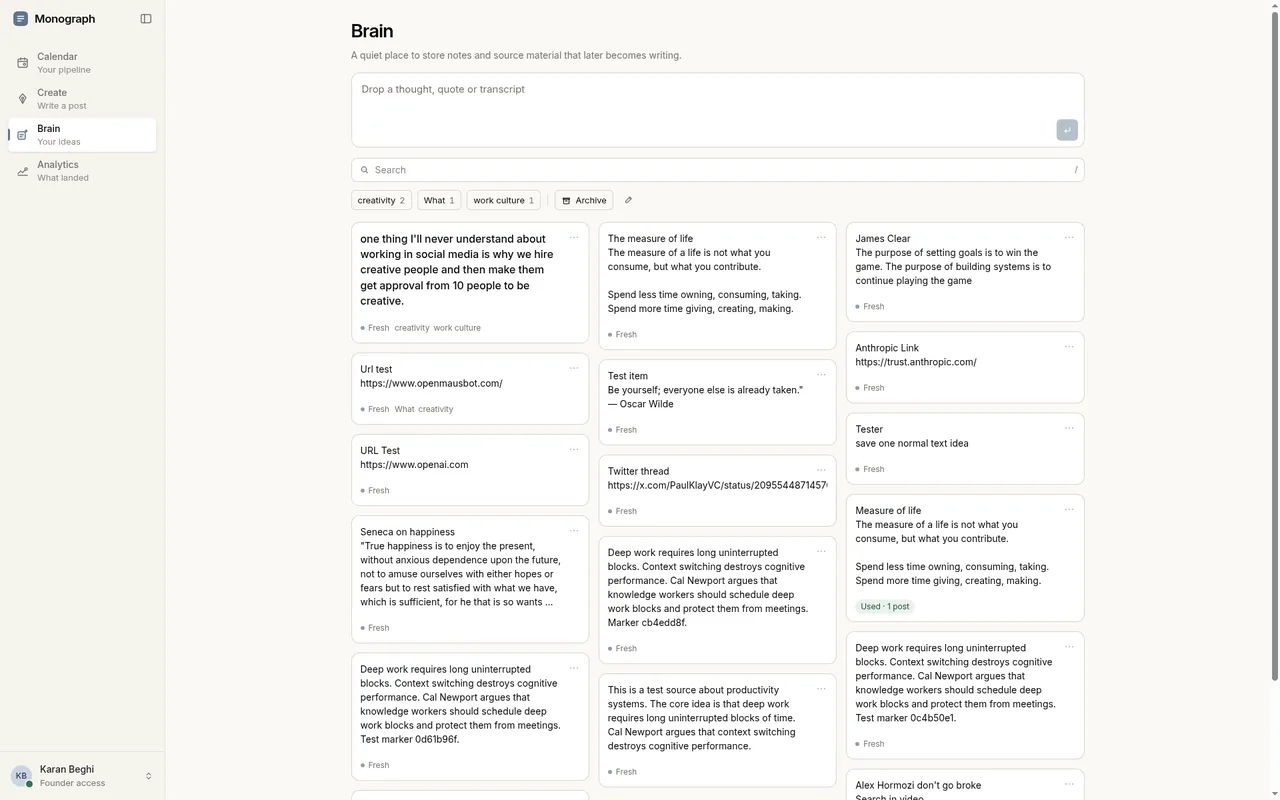
Pick the one you already open without thinking. If capturing an idea takes more than a few seconds, you'll skip it on busy days, and busy days are when the best material shows up. If you'd rather keep ideas next to where you write, Monograph's Brain holds your notes, excerpts and pasted transcripts in one place so they're ready when you sit down to review. Every time I find an interesting snippet or a valuable post, I add it to Brain so I have something to work from when I come up with new content later.
Tip: Capture raw. Half a sentence in your own words is fine. Editing at the moment of capture is how good ideas get judged too early and thrown away.
How do I turn meetings and customer calls into LinkedIn posts?
Within a few minutes of a conversation ending, write down the one question, objection or decision worth remembering, in the words people actually used.
You don't need meeting minutes. You need the line that made you think. Things worth listening for:
- Questions you hear more than once, from different people.
- Things you had to explain twice before they landed.
- Objections and doubts, especially ones you disagree with.
- Decisions, and the reasoning that got you there.
- Moments where you changed your mind.
Keep the other person's exact phrasing when you can. It tells you how your readers describe the problem, which is usually different from how you'd describe it.
Be careful with what you share. Remove names and anything confidential, and ask before you write about a specific customer or colleague.
Example (illustrative): After a sales call you note: "Third person this month asked whether this works for a two-person team." That one line is enough to come back to later.
How do I turn a raw note into a post angle?
Ask three questions of the note: what do I actually think about this, who needs to hear it, and what specific detail proves it. The answers give you an angle you can write.
This is the step most advice skips. A note like "pricing question again" isn't a post yet. Here's how to work through it:
- Turn the note into a claim you'd defend. Write one sentence you believe and could argue for in a meeting. From the example above: "Most tools are priced for teams, and solo founders end up paying for seats they don't need."
- Name the reader. Decide who this is for: founders choosing tools, people who sell software, or both. One reader keeps the post focused.
- Choose the shape. Decide whether it's a lesson, an opinion, a short how-to, a story or an open question you're still working through. The same note can take any of these shapes.
- Find the proof. Look for one detail only you have: what someone said, a decision you made, a number from your own work. If you can't find one yet, keep the note and wait.
- Write the first line as the claim. Lead with the point. Context and supporting detail come after.
Tip: One note often holds more than one angle. Write the others down as new notes rather than squeezing them into the same post.
Example: I once saved a note in a Notion brain dump about something that fascinates me: everything ever discovered on earth was already here, and smart minds simply put the pieces together to bring it to reality. That note became a post on X that opens: "How obvious, yet brain-puzzlingly insane is it that everything ever invented or discovered was already here on earth long before we put the pieces together?"
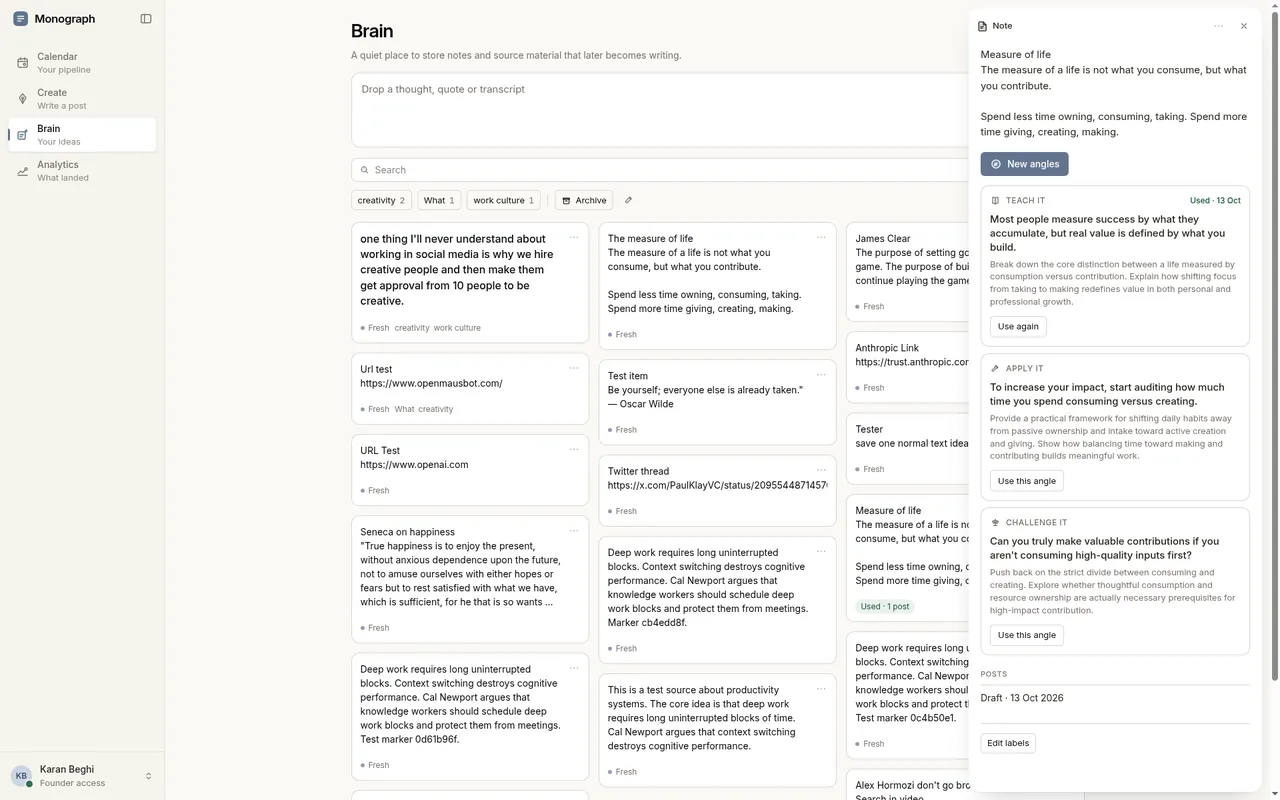
In Monograph, you can explore a few angles from a note saved in Brain, choose one and keep writing in Create, where you can ask for a stronger hook or a shorter version and review each suggestion before using it, so the thinking stays yours.
How often should I review my ideas?
Once a week is enough for most people: a short session to delete weak ideas, merge duplicates and pick the two or three you'll write next.
Capture and judgement work better as separate habits. Getting Things Done lists "review frequently" as its own step, and Tiago Forte describes processing his notes inbox "in one batch about once a week". The same rhythm suits LinkedIn ideas.
Keep the review short and practical. Read each note, decide whether it still interests you, and move the strongest ones into your plan for the week. If you find yourself writing full posts during the review, stop and save that for a writing session.
What should founders post on LinkedIn?
Founders should post what they see from inside the work: decisions, customer problems, lessons from mistakes, and opinions about their industry that they'd defend in a real conversation.
These are the places founder ideas usually come from, and where to capture them:
- Decisions: what you chose, what you turned down and why. Capture after planning meetings.
- Customer problems: the pain in their words, before your product enters the picture. Capture after sales and support conversations.
- Mistakes and changes of mind: what you'd do differently now. Capture when something goes wrong or surprises you.
- Industry opinions: where you disagree with common advice. Capture when you read or hear something that bothers you.
- Building in public: what you're working on and what you're learning. Capture at the end of each week.
A useful test before you post: would this still be worth reading if your product were never mentioned? Attention on LinkedIn has to be earned, and posts that exist mainly to promote tend to get scrolled past. Write for the people you want to be remembered by, and let the product come up when it genuinely fits.
How do I post consistently without thinking about content all day?
Split the work into separate jobs: capture in seconds during the week, choose and write in one or two planned sessions, and schedule posts ahead so publishing doesn't depend on how you feel that morning.
Consistency usually breaks because every post starts from zero: finding an idea, shaping it, writing it and publishing it all in one sitting. When the ideas are already waiting in your list and the angle is clear, writing gets much faster.
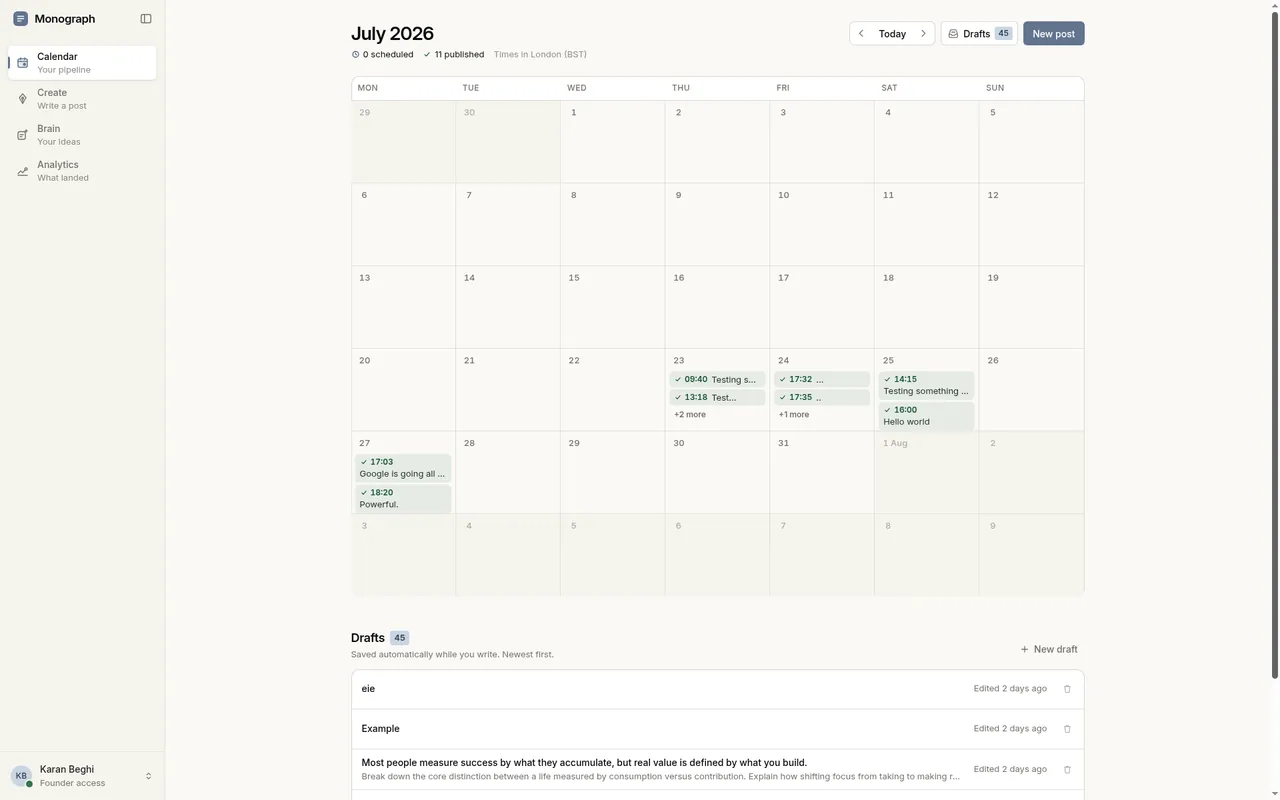
Scheduling helps with the last step. LinkedIn lets you schedule posts to go live later from the post composer, and dedicated tools add a calendar view so you can see drafts and scheduled posts together. If you use Monograph, the calendar shows your drafts, scheduled posts and published work together, which makes it easier to spot a quiet week before it arrives.
Choose a rhythm you can keep for months, rather than one you can only manage in a good week.
Can AI find post angles in my notes?
Yes. AI is useful for suggesting angles, spotting links between notes and pushing back on a weak claim, as long as the experience and the opinion still come from you.
The difference is in what you give it. Asking AI to "write a LinkedIn post about leadership" gets you something anyone could have posted. Giving it your own raw note and asking for four or five possible angles gets you options built on something real, and you choose which one is true to you.
A few ground rules help:
- Start from your note, never from a blank topic.
- Ask for angles and questions before you ask for a draft.
- Check every fact and remove anything you didn't actually experience.
- Keep your judgement and your voice in the final version.
Brain is where Monograph keeps your ideas. Save a thought, an excerpt or a transcript you already have, explore different angles, choose one and keep writing in the editor. You decide what becomes a post. See how Brain works and capture the next idea before it slips away.
FAQ
Do I need a special app to capture LinkedIn ideas?
No. Any tool you'll actually open in a few seconds works. What matters is having one place for everything and reviewing it every week.
What if my ideas feel too small or obvious to post?
Small, specific observations often make better posts than big themes. Something that feels obvious after years in your job is often new to the people reading.
How many ideas should I have saved before I start posting?
There's no set number. A handful of ideas you have something real to say about is enough to start, as long as you keep capturing as you go.
Can I turn one idea into more than one post?
Yes. The same note can become an opinion, a how-to or a story for different readers, and you can return to it when your thinking changes.
Put this into practice in Monograph.
Draft your hook, save ideas for later and schedule the post when it's ready. 7-day free trial · Then $19.99 USD per month · Cancel anytime